Creating Comprehensive User Guides: Best Design Practices
When building user guides or staff manuals, the goal is to present complex information—often involving multiple screenshots and detailed steps—in a way that is clean and easy to navigate.
While common tools like the standard Accordion widget work for simple text, they can be restrictive when you need to embed multiple images or intricate layouts. Here are the two best ways to design high-quality guide pages.
Option 1: The Tabs Widget
The Tabs widget is an excellent choice if you want to keep all steps of a specific process on a single page without creating a "wall of text."
Design Freedom: Unlike basic accordions, advanced tabs allow you to drag and drop multiple widgets (images, buttons, text blocks) into each individual tab section.
How to set it up:
Search for the Tabs widget in the left-hand panel and drag it onto your canvas.
Define your headers (e.g., Step 1: Login, Step 2: Dashboard Overview).
Click into the content area of each tab to build your layout using rows, columns, and images.
Option 2: Dedicated Guide Pages (Recommended for Long Guides)
If your user guide requires a significant number of screenshots and long descriptions, creating separate pages for each category is the most professional and scalable approach.
Why separate pages are often best:
No Content Limits: You aren't restricted by a widget's structure. You can use as many sections, images, and videos as necessary to make the instructions clear.
Better Navigation: You can provide staff with a direct URL to a specific guide (e.g.,
yoursite.com/guides/login) rather than asking them to find a specific tab on a long page.SEO & Search: Individual pages are easier for internal search tools to index, making it simpler for staff to find exactly what they need.
Pro Tip: Use Side Navigation
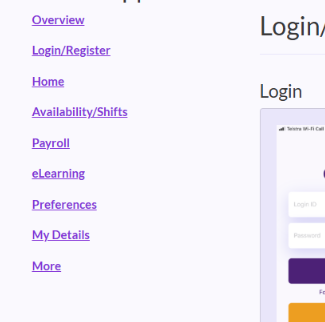
When using separate pages, we recommend adding a Navigation Widget to the left-hand side of your layout (a sidebar).
Set the menu to show your list of guides.
This allows users to jump between different chapters or steps easily without having to return to a main landing page every time.
Was this article helpful?
That’s Great!
Thank you for your feedback
Sorry! We couldn't be helpful
Thank you for your feedback
Feedback sent
We appreciate your effort and will try to fix the article