Enhance Your Site with Our Brand New Custom Widgets
We are excited to announce that we have just expanded our editor’s library with a massive drop of creative, high-performing custom widgets! These new design elements are available immediately for anyone to use across all of your websites.
Whether you want to add slick hover animations, dynamic text effects, or eye-catching layouts, these widgets give you the power to create professional, "wow" factor designs with zero coding required.
What’s New in Your Widget Library?
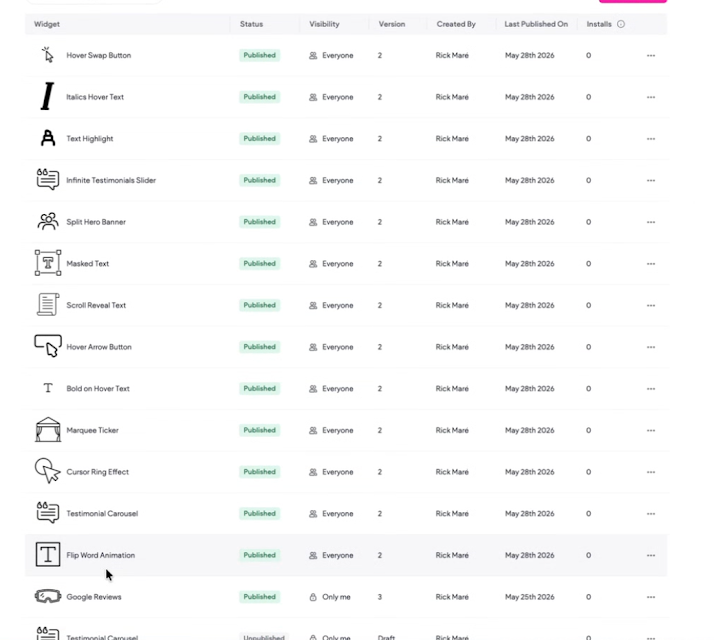
Here is a breakdown of the brand-new elements you can drag and drop onto your canvas today:
Interactive Buttons & Cursors
Hover Swap Button: Create a smooth, engaging transition effect when a user hovers over a call-to-action button.
Hover Arrow Button: Add a sleek, moving directional arrow to your buttons to guide user interaction on hover.
Cursor Ring Effect: Elevate your site's user experience with a modern custom cursor element that follows the user's mouse with a responsive ring.
Advanced Text & Animations
Flip Word Animation: A dynamic text widget that physically flips words in place—perfect for highlighting multiple service offerings or values in a hero section.
Scroll Reveal Text: Make your copy elegantly fade or slide into view as visitors scroll down your page.
Bold on Hover Text & Italics Hover Text: Create subtle, sophisticated micro-interactions that change text styling dynamically when a mouse glides over it.
Text Highlight: Instantly draw attention to important phrases or keywords with an elegant, styled background marker effect.
Masked Text: Achieve high-end editorial designs by masking images or gradients directly inside your headline text.
Marquee Ticker: Create a continuous, smooth horizontally scrolling bar of text—ideal for flashing announcements, breaking news, or core brand pillars.
Testimonials & Hero Layouts
Infinite Testimonials Slider: A clean, continuously looping social proof slider that displays customer praise without making users manually click "next."
Testimonial Carousel: A classic, fully customizable touch-friendly carousel layout to showcase client reviews and ratings beautifully.
Split Hero Banner: Split your main header section into perfectly balanced visual columns to display contrasting text, images, or distinct calls-to-action simultaneously.
How to Find and Use the New Widgets
Getting started is simple. Because these updates are built right into our system, you don't need to install or buy anything extra.
Open any site inside your editor.
Navigate to the Widgets panel on the left-hand menu.
Scroll through or search for any of the widgets listed above (e.g., "Flip Word Animation" or "Hover Swap Button").
Drag the widget directly onto your canvas and use the intuitive design panel to customize colors, fonts, speeds, and content.
Designed for Everyone
All of these newly added elements are fully responsive out of the box, ensuring that your animations, sliders, and buttons look absolutely flawless across desktop, tablet, and mobile breakpoints.
Head over to your editor dashboard today to experiment with these brand-new tools and see how they can transform your next web design project!
Was this article helpful?
That’s Great!
Thank you for your feedback
Sorry! We couldn't be helpful
Thank you for your feedback
Feedback sent
We appreciate your effort and will try to fix the article